



August 31, 2023
We use cookies to make your experience better. Learn more
Education Authority & NHS Approved Supplier - View our Frameworks
Introducing the Causeway Sensory Interactive Bubble Wall Panel
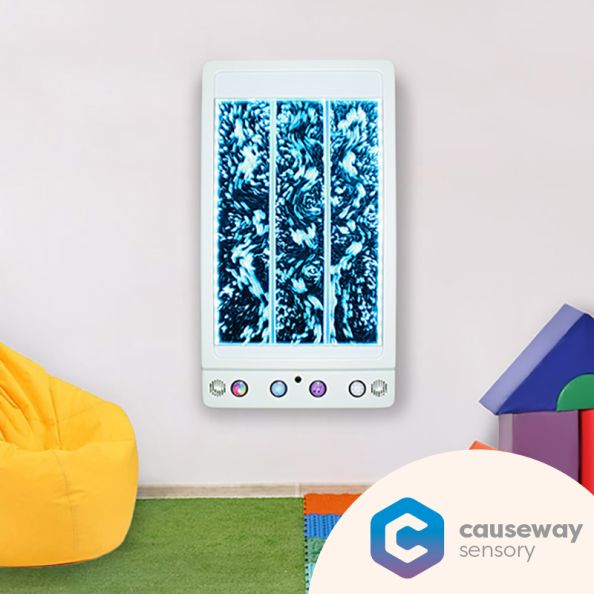
The Causeway Sensory Interactive Bubble Wall Panel lets you choose colours while music plays in the background through the built-in speakers and micro SD card. The action reaction effect by influencing the different bubble flows make it a unique & magical panel. Watch in awe as the rising bubbles are bathed in vibrant LED lights that change colours, creating a mesmerizing visual display.
Size: H900 x W500 x D100mm
Operation
Once the Causeway Sensory Interactive Bubble Wall Panel is filled, simply plug the panel into the mains socket and switch on the power. The LCD display will light up and display a lock symbol. The panel will start in the last mode used. The unlock the panel, press and hold down the up and down arrow keys for 3 seconds.
The following menu options can now be accessed with the use of the arrow keys. Press OK button to select.
Panel Buttons
The Bubble Panel ha 4 robust buttons at the base for easy access.
SD Card
The panel comes with a micro SD card with 11 music tracks, including 1 blank track. Users can replace this micro SD card with another to suit their own personal preferences.
External Microphone
A microphone is included as standard with every Bubble Panel. When this is plugged into the microphone socket, located between the blue and purple buttons, the internal microphone is disabled, allowing for more focused sound-to-light activities.
Modes
The Bubble Panel comprises different modes for use with the included microphone, each one providing visual stimulation and teaching cause and effect.
Mode 1: No Microphone
Mode 2: Colour Cycle
Mode 3: Bubbles Activate
Mode 4: Colour Change and Bubbles Activate
Mode 5: Colour Face & Bubbles Deactivate
Key Features:
Interactive: Change the colours remotely with one of our Causeway Wireless Interactive Controllers.
Cause & Effect: Simple button press turns bubbles on and off and changes colours making it an ideal tool for teaching cause and effect.
Music & White Noise: Relax with soothing music tracks and white noise sounds, setting the scene for a soothing sensory experience.
LED Light Patterns: Three LED Light Patterns for a visually stimulating or relaxing display.
Sound Reactive: Using the built in or external microphone to control colour, bubbles or both. You can also 'Blow Bubbles' by blowing into the microphone and activating the bubbles.
Sound Reactive: Utilize the external microphone (included) to control colour, bubbles, or both, with the added fun of "blowing bubbles" by blowing into the mic.
Quiet Mode: Responds to noise and turns bubbles and colour change off. Keep quiet to keep the bubbles flowing and the lights turned on.
Package Contents
Installation
To begin, you will need to remove the two white brackets from the back of the panel. Note the fixing on the top bracket will need to be removed. Once removed, locate the enclosed drilling template and use to drill mounting holes for the brackets. Once mounted, hang the Causeway Sensory Interactive Bubble Panel on the brackets and secure by replacing the top bracket fixing.
Filling
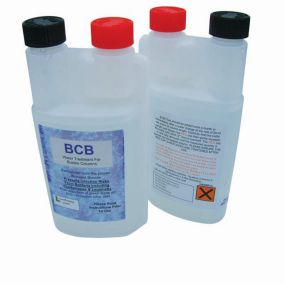
Please use the pump supplied. With the Causeway Sensory Interactive Bubble Panel powered off, connect the pump hose to the pipe coming out of the bottom of the panel. Fill a bucket with water. the panel holds approximately 3 litres of water, The bucket should hold more than this so that the pump does not run dry when filling. Add BCB water treatment to the water, Approximately 1.5ml of treatment should be added for each litre of water used to fill the bucket. E.g. if 4 litres of water are in the bucket, 6ml of BCB fluid should be added. Allow the water level to reach 1cm below the bottom of the white sticker at the top of the panel. Turn the pump off by unplugging it from the socket. Once filled, disconnect the pump hose from the panel.
Draining
Turn the bubble panel off. Place the open end of the drain hose into an empty bucket. Connect the drain hose to the same pipe used to fill the panel. Allow the panel to fully drain out into the bucket. Once empty, disconnect the drain hose and dispose of the old water. The water in the panel should be changed once a month, with fresh water treatment added.
Introducing the Causeway Sensory Interactive Bubble Wall Panel
The Causeway Sensory Interactive Bubble Wall Panel lets you choose colours while music plays in the background through the built-in speakers and micro SD card. The action reaction effect by influencing the different bubble flows make it a unique & magical panel. Watch in awe as the rising bubbles are bathed in vibrant LED lights that change colours, creating a mesmerizing visual display.
Size: H900 x W500 x D100mm
Operation
Once the Causeway Sensory Interactive Bubble Wall Panel is filled, simply plug the panel into the mains socket and switch on the power. The LCD display will light up and display a lock symbol. The panel will start in the last mode used. The unlock the panel, press and hold down the up and down arrow keys for 3 seconds.
The following menu options can now be accessed with the use of the arrow keys. Press OK button to select.
Panel Buttons
The Bubble Panel ha 4 robust buttons at the base for easy access.
SD Card
The panel comes with a micro SD card with 11 music tracks, including 1 blank track. Users can replace this micro SD card with another to suit their own personal preferences.
External Microphone
A microphone is included as standard with every Bubble Panel. When this is plugged into the microphone socket, located between the blue and purple buttons, the internal microphone is disabled, allowing for more focused sound-to-light activities.
Modes
The Bubble Panel comprises different modes for use with the included microphone, each one providing visual stimulation and teaching cause and effect.
Mode 1: No Microphone
Mode 2: Colour Cycle
Mode 3: Bubbles Activate
Mode 4: Colour Change and Bubbles Activate
Mode 5: Colour Face & Bubbles Deactivate
Key Features:
Interactive: Change the colours remotely with one of our Causeway Wireless Interactive Controllers.
Cause & Effect: Simple button press turns bubbles on and off and changes colours making it an ideal tool for teaching cause and effect.
Music & White Noise: Relax with soothing music tracks and white noise sounds, setting the scene for a soothing sensory experience.
LED Light Patterns: Three LED Light Patterns for a visually stimulating or relaxing display.
Sound Reactive: Using the built in or external microphone to control colour, bubbles or both. You can also 'Blow Bubbles' by blowing into the microphone and activating the bubbles.
Sound Reactive: Utilize the external microphone (included) to control colour, bubbles, or both, with the added fun of "blowing bubbles" by blowing into the mic.
Quiet Mode: Responds to noise and turns bubbles and colour change off. Keep quiet to keep the bubbles flowing and the lights turned on.
Package Contents
Installation
To begin, you will need to remove the two white brackets from the back of the panel. Note the fixing on the top bracket will need to be removed. Once removed, locate the enclosed drilling template and use to drill mounting holes for the brackets. Once mounted, hang the Causeway Sensory Interactive Bubble Panel on the brackets and secure by replacing the top bracket fixing.
Filling
Please use the pump supplied. With the Causeway Sensory Interactive Bubble Panel powered off, connect the pump hose to the pipe coming out of the bottom of the panel. Fill a bucket with water. the panel holds approximately 3 litres of water, The bucket should hold more than this so that the pump does not run dry when filling. Add BCB water treatment to the water, Approximately 1.5ml of treatment should be added for each litre of water used to fill the bucket. E.g. if 4 litres of water are in the bucket, 6ml of BCB fluid should be added. Allow the water level to reach 1cm below the bottom of the white sticker at the top of the panel. Turn the pump off by unplugging it from the socket. Once filled, disconnect the pump hose from the panel.
Draining
Turn the bubble panel off. Place the open end of the drain hose into an empty bucket. Connect the drain hose to the same pipe used to fill the panel. Allow the panel to fully drain out into the bucket. Once empty, disconnect the drain hose and dispose of the old water. The water in the panel should be changed once a month, with fresh water treatment added.
| Brand | Causeway Sensory |
|---|---|
| Additional Information | Built In Speakers |
| Intended Room Use | Sensory Room |
| Indoor/ Outdoor | Indoor |
| Product Class | Interactive Wall Panel - Bubble |
| Item Depth | 100mm |
| Item Height | 900mm |
| Item Width | 500mm |
We deliver to Northern Ireland, ROI, UK Mainland, Scottish Highlands, Scottish Islands, Isle of Man and Isle of Wight. Deliveries to other locations can be arranged by calling our office on 028 7134 6767.
Larger items, such as furniture and bespoke items can take up to 28 Days for delivery. Stock items are usually delivered within 2-3 Days. Deliveries are carried out by a national courier, and require a signature.
All products requested will be delivered by Creative Activity free unless the order is under £100/ €150 +VAT in which case a service charge of £7.95/ €12.94 +VAT will apply for orders to Northern Ireland and Ireland. Carriage to UK Mainland and other areas will be quoted at time of order.
In no circumstances will the seller be liable for loss or damage of any kind whatsoever caused directly or indirectly by the delay in the delivery of goods.
These will attract a separate charge, details available from the local Creative Activity Service Centre.

Thank you.
We will email you when this item is available.